


Calls or quote forms? A tradie website should offer both, with a phone number that’s easy to tap and a quote request that’s simple to complete. Pairing calls with a tradie website quote form gives visitors a clear way to get in touch, whether they’re ready to talk or prefer to send job details first.
It makes sense to favour calls when a job is urgent or needs a quick conversation. But not every potential customer can call while they’re browsing, and a form lets them explain what they need in their own time. In ACMA’s 2025 consumer research, 97% of Australian adults used a mobile phone to access the internet, so the contact options need to work smoothly on a small screen.
This guide explains when to invite calls and when to request a quote, and how to make each call to action clear. You’ll also learn what information to collect, how enquiry alerts and quote templates fit into the process, and how to clarify the next step for you and the person requesting a quote.
Key Takeaways
- Ask for the job details you need to assess an enquiry, and make file uploads available when photos or plans would help.
- Match the contact path to the job: consider urgency, complexity and how much detail you need before responding.
- Use clear, specific call-to-action wording so visitors know what happens when they tap or submit.
- Set up quote alerts that direct each enquiry to the right person, with enough context to follow it up efficiently.
- Use a consistent quote template, then tailor its formatting and details to suit the work.
1. Should a tradie website push phone calls or quote forms?
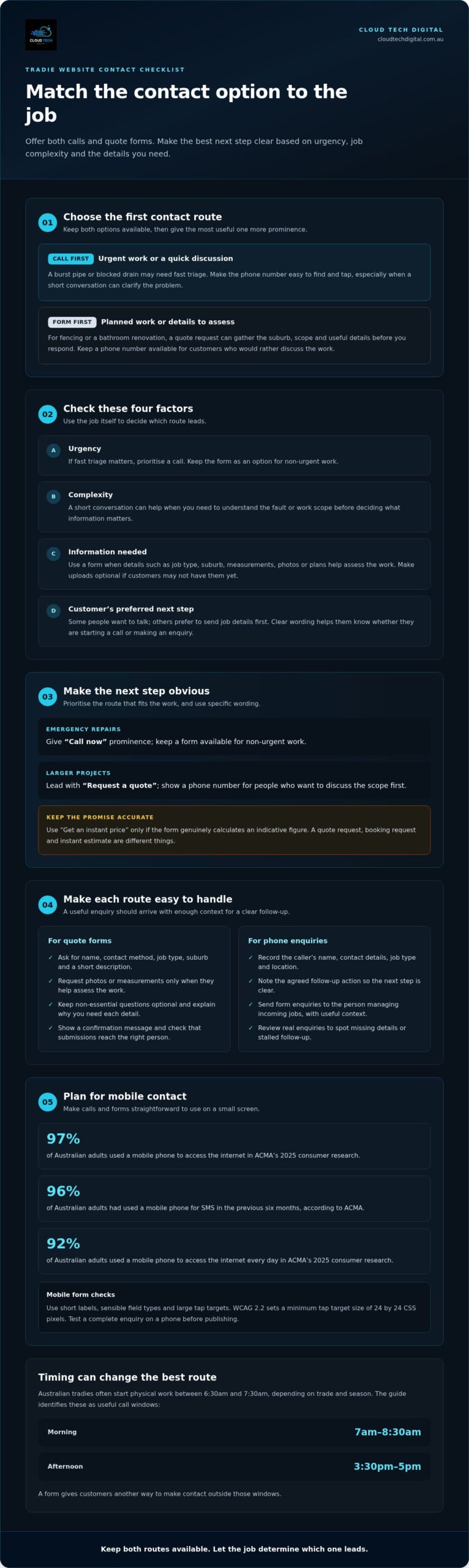
Offer both, then make the best option clear for each job. Calls suit urgent problems or work that needs a quick discussion; forms suit planned jobs where photos, measurements or an address help you assess the work. A tradie website quote form should support enquiries, not replace a visible, tappable phone number.
Australian mobile use makes clear contact options practical. According to ACMA, 96% of Australian adults had used a mobile phone for SMS in the previous six months. In ACMA’s 2025 consumer research, 97% used a mobile phone to access the internet. Keep the phone option prominent, while giving visitors a straightforward way to send job details.
There’s no universal best quote form builder. WordPress and Squarespace can both support quote requests. Choose based on your existing website, the fields you need, file uploads and how submissions reach your team. Test the finished form on a phone before publishing it.
A quote form collects information to help you assess a job and respond. A booking form lets a visitor request a time, while an instant estimate calculator produces an indicative figure from entered details. For example, a plumber might use a quote form to ask about a leak rather than promise a fixed estimate before inspecting it.
Australian businesses covered by the Privacy Act need to manage personal information transparently and collect only what is reasonably necessary for their functions. Explain why you ask for each detail, keep required fields relevant, and make any marketing opt-in separate from the quote request.
The cost of adding a form depends on the case and is given after a quote request. Factors include the website platform, conditional fields, file uploads, design and how submissions are routed; a basic form differs from one that connects to other business systems.
On WordPress or Squarespace, choose a form tool compatible with your site, add the fields, set where submissions go and test a complete enquiry. Include a confirmation message and check that your business receives the details. Ask for a name, contact method, job type, suburb and a short description.
Ask for photos, measurements and job location when they help assess the work. A fencing form could request the fence length and site photos; an electrician’s form might ask about the property and fault. Keep uploads optional for visitors who can’t provide them yet.
Reduce spam with a honeypot or CAPTCHA, then restrict form access to the people handling enquiries and use a secure website connection. On mobile, use short labels, sensible field types and large tap targets. WCAG 2.2 sets a minimum tap target size of 24 by 24 CSS pixels, supporting easier interaction on small screens.
Many tradies under 45 prefer text messages for initial enquiries. In ACMA’s 2025 consumer research, 92% of Australian adults used a mobile phone to access the internet every day, supporting easy mobile contact.
2. Choosing between calls and quote forms
Choose the first contact option based on the decision the customer needs to make. A burst pipe needs a quick conversation, while a planned bathroom renovation benefits from details collected before you respond. Keep both options available, but give the urgent one more prominence when fast triage matters.
Consider the enquiry’s complexity, urgency and information needs. A customer with a blocked drain can call and describe the symptoms. Someone planning new fencing can submit the suburb, approximate fence length and preferred material, giving you useful context before a discussion.
Timing also affects how people make contact. Australian tradies often start physical work between 6:30am and 7:30am, depending on trade and season. A guide identifies 7am to 8:30am as a useful call window, with 3:30pm to 5pm as another option. A form gives customers an alternative outside those windows.
Use the job type to decide which button takes priority. For emergency repairs, make “Call now” prominent and keep a form available for non-urgent work. For larger projects, lead with “Request a quote” and offer a phone number for people who want to discuss the scope first. Visitors from Google search should see the right next step without having to guess.
Some enquiries need a short conversation before you can decide what information matters. An electrician, for example, might ask about the fault, property type and suburb on a call. If a customer asks about an electrician’s licence, answer clearly and keep the conversation focused on the job’s scope and next step.
Set a simple process for handling both routes. Record the caller’s name, contact details, job type, location and agreed follow-up action. For a form submission, send the same useful details to the person managing enquiries. Keep non-essential questions optional, so customers can make initial contact without completing a long questionnaire.
Review the routes using real enquiry records. Note which jobs arrive by phone or form, which details are missing, and where follow-up stalls. If customers repeatedly ask about the same service, a focused tradie landing page can explain that work and direct visitors to the appropriate contact option.
3. Clear calls to action
A strong call to action tells visitors exactly what happens next. Replace “Submit” with “Request a quote” when the form collects job details, or use “Call now” when a quick conversation suits the work. A homeowner seeking a leaking tap repair shouldn’t have to guess whether a button starts a call or sends an enquiry.
Match the button text to the action behind it. If a customer taps “Book an inspection”, show available appointment details or explain that you’ll contact them to arrange a time. If the next step is a quote discussion, say “Request a quote”. Don’t label a form “Get an instant price” unless it genuinely calculates one.
Use specific wording near the button to set expectations. For example, “Tell us your suburb and what needs fixing” explains what visitors should prepare. A builder handling kitchen renovations could use “Send your renovation details” and invite customers to include plans or photos. Keep instructions beside the relevant field, not buried on another page.
On mobile, put the main action where it’s easy to find and tap. Keep “Call now” visible near the phone number, and use a separate button for quote requests. WCAG 2.2 sets a minimum tap target size of 24 by 24 CSS pixels. Clear spacing also helps visitors avoid hitting the wrong action while browsing on a small screen.
Make each button visually distinct from surrounding text, then use the same wording consistently. If the header says “Request a quote”, don’t switch to “Get started” beside the form. That mismatch can leave visitors unsure whether both actions lead to the same place. A short message above the form can explain what happens after submission, such as “We’ll use these details to discuss your job.”
- Use “Call now” for a phone call, not a form submission.
- Use “Request a quote” for an enquiry that needs job details.
- Use “Send photos” only when the upload field accepts attachments.
Track each action separately to see whether visitors call or submit a form. Configure analytics events for phone-number taps and successful form submissions, then compare the records with actual enquiries. If a page attracts visits but few completed enquiries, check whether its button is visible, its wording matches the form, and the next step is clear.
A focused landing page for a trade service can align its headline, job details and call to action around one customer need. For example, an air-conditioning page can direct urgent breakdown enquiries to a call while guiding planned installations to a quote request.
4. Quote capture and alerts
A submitted form needs to reach the person who can act on it. Capture each enquiry in a central inbox or job-management system rather than relying on one staff member’s memory. For example, a plumber can review the customer’s location, leak description and preferred contact method together.
Keep a useful record of every submission. Store the customer’s name, phone or email, job type, location, message, submission time and any uploaded files. These details help the person handling the enquiry understand the request before calling. Avoid collecting information without a clear purpose for assessing or following up the job.
Set alerts that include enough context for quick triage. A subject line such as “New hot water repair enquiry” is clearer than “Website form received”. Include the customer’s preferred contact method and a secure link to the full record, rather than exposing sensitive details unnecessarily in an email notification.
Route enquiries according to the work requested. A roofing job could go to the estimator, while an urgent blocked drain could alert the person managing service calls. If one person handles every enquiry, a shared mailbox can keep the trail visible when they’re away from their desk.
Tell customers what happens after they submit. Show a confirmation message on the website and send a written acknowledgement if your process supports it. For example: “Thanks, we’ve received your request about the leaking tap. We’ll use your details to follow up about the job.” Don’t imply that an appointment or quote is confirmed unless it is.
Test the complete journey before publishing a form change. Submit a test enquiry with a sample name, location, message and attachment. Confirm that the website displays its success message, the alert arrives and the record contains the submitted details. Test again after changing notification settings or routing rules.
Use a clear status for each enquiry. A simple workflow might move from “New” to “Contacted”, then “Site visit needed” or “Quote prepared”. That record helps a small team see who has responded and what action remains, without asking the customer to repeat information.
Review missed or delayed notifications by comparing website submissions with the shared inbox and job records. If a form captures a request but no alert reaches the right person, fix the destination or routing rule. A service-specific landing page can also direct different job types to the most suitable enquiry pathway.
5. Quote templates and custom formatting
A quote template gives each customer a clear, consistent proposal without making every job look identical. Start with your business details, the customer’s name, job address, scope, price, inclusions and next step. For a bathroom renovation, separate demolition, plumbing and tiling so the customer can see what each part covers.
Build a base template for each distinct service, then adjust it for the actual job. A painter’s template might cover surface preparation, paint type, coats and rooms included. A fencing template could describe fence materials, removal of existing panels and site access. These trade-specific details make the written quote more useful than a generic total.
Keep inclusions and exclusions separate. State what the price covers, then identify items outside the scope, such as repairs discovered after work begins. Use plain language and define technical terms customers may not recognise. For example, specify which surfaces are included instead of writing only “prep and paint”.
Use a predictable layout so customers can find important details quickly. Place the job summary and total near the beginning, followed by line items, assumptions and acceptance instructions. Add your logo and consistent colours, but keep headings readable on a phone. A customer opening a quote between appointments should be able to scan the scope without zooming.
Photos and supporting documents can clarify a proposal. Attach site photos, product selections or a marked-up plan when they explain the quoted work. Label each file clearly, such as “Kitchen splashback area”, rather than “IMG_4821”. Before sending, confirm each attachment belongs to that customer and matches the written scope.
Use the quote form to capture details that help populate the right template. A customer selecting “deck repairs” could see fields for the affected area and optional photos. Keep those answers separate from the final price, which should reflect the assessed work and your terms. Don’t let an automated template turn incomplete information into a firm quote.
Before sending a proposal, follow a short review process: check the customer’s name and address, compare each line item with the agreed scope, verify attachments and confirm the acceptance instructions work. A second staff member can review larger or unusual jobs, helping catch mismatched details before the quote reaches the customer.
If your service pages and quote process need to align, build a focused trade landing page that guides customers from the job description to the right enquiry path.
Cloud Tech Digital: Lead Generation Agency in Australia
Cloud Tech Digital helps Australian tradies connect their websites with practical lead generation. If visitors reach your site but aren’t sending suitable enquiries, review how your pages, quote requests and marketing work together.
Cloud Tech Digital’s web design and lead generation services can help create a clearer path from a service page to a useful enquiry. Pay Per Click and Facebook Ad Management can bring targeted traffic to those pages, while your website gives visitors a clear way to call or request a quote.
Consider this support when you’re ready to improve how your website attracts and captures enquiries, rather than simply adding more fields to a form. Contact Cloud Tech Digital to discuss your tradie website and lead generation needs.
Turn more website visits into useful enquiries
Your next improvement may not be another field or button. Look at the whole path: what brings a potential customer to the page, what they need to decide and what happens after they get in touch. A tradie website quote form works best as part of that journey, supported by relevant traffic, a focused service message and a clear way to enquire.
If you’re reviewing how your website attracts and converts leads, Cloud Tech Digital offers lead generation, Pay Per Click and Facebook Ad Management for Australian businesses. These services can connect advertising with pages designed to turn interest into enquiries. The right next step depends on where your process needs attention, whether that’s attracting suitable visitors or improving the page they land on.
Contact Cloud Tech Digital today to discuss your website and lead generation goals. A practical review can help you decide what to improve next and build a clearer path from visitor to enquiry.
Frequently Asked Questions
Should a tradie website push phone calls or quote forms?
Offer both, then prioritise the route that best suits the job. For an urgent electrical fault, a phone call lets the customer explain immediate safety concerns; a planned switchboard upgrade can start with a written enquiry. Keep the secondary option available too. Visitors who can’t call during work hours may still provide enough information for your team to decide on an appropriate follow-up.
How many fields should a tradie quote form have?
Include only fields that help you understand the job and contact the customer. The right number depends on the trade and the work: a basic tap repair needs less detail than a multi-room renovation. Start with essential questions, then use conditional fields for relevant follow-ups. For example, selecting “roof repair” could reveal a question about roof access, without showing that field to every visitor.
What should a tradie website quote form include?
Ask for the customer’s name, preferred contact details, job category, location and a short description. Tailor additional questions to the service, such as property type for an insulation enquiry or access details for a roof inspection. Make required fields clear and briefly explain how submitted information will be used. This helps customers complete the form with confidence.
How can a tradie website quote form qualify leads and reduce time-wasters?
Use relevant questions to establish whether the request matches your services and working area. A painting contractor could ask which rooms need attention and whether the property is occupied; a roofing business might ask whether the request concerns a repair or replacement. Clear options help customers describe their needs accurately. Keep the form respectful and practical, without demanding sensitive details before a conversation.
What are the best quote form builders for Australian tradie websites?
There’s no universal best quote form builder. WordPress and Squarespace can both support quote forms. Choose based on your website platform, required fields, file uploads and how submissions reach your team.
How much does it cost to add a quote form to a tradie website in Australia?
The cost depends on the website platform, conditional fields, file uploads, design and how submissions are routed. It is provided after a quote request.
