


What if the best CRM for your trade business isn’t the one with the most features, but the one that makes every enquiry’s next step clear? A lead generation strategy for tradies can bring new enquiries in, but those opportunities are harder to turn into booked work when details are scattered across calls, emails, messages and notes.
If you’re often on the tools, keeping up with every follow-up can feel like another job. You need a practical way to capture enquiries, see who needs a response and understand which marketing activity is leading to real work, without adding unnecessary admin.
This guide compares CRM approaches against the day-to-day needs of Australian trade businesses, from trade-focused job management systems to general-purpose CRMs. You’ll see what to consider when comparing features, costs and team fit, then learn how to set up a simple, repeatable process for recording enquiries and following them through. We’ll also cover how consistent lead tracking connects marketing activity with outcomes, so you can make clearer decisions about where to focus next.
Key Takeaways
- Choose a CRM approach that suits your team’s size, workload and existing processes, rather than paying for features you won’t use.
- Use a simple enquiry workflow to make the next action clear, from first contact through to the final outcome.
- Consistent source labels can help your lead generation strategy for tradies show which marketing channels bring in enquiries and booked work.
- Start with only the customer details, stages and follow-up actions your team can reliably keep up to date.
- Connect accurate CRM records with website and campaign tracking to make more informed marketing decisions over time.
Why a CRM for a Small Trade Business Starts with Enquiry Follow-Up
A lead generation strategy for tradies can bring enquiries in from several directions: a phone call, a website form, a referral, an organic search or a social media advert. The challenge is keeping track of each opportunity once it arrives, especially when you’re moving between jobs. A customer relationship management system, or CRM, gives you one place to record customer details, enquiry history and the next follow-up action.
CRM describes a broad approach to managing customer interactions, as outlined in this Customer Relationship Management (CRM) overview. For a small trade business, the practical goal is straightforward: make it clear who enquired, what they need and what should happen next. A CRM organises leads; it doesn’t create demand or guarantee that an enquiry becomes a booked job.
What does a CRM do for a tradie?
A useful customer record might include a person’s name and contact details, the service they’re after, where they heard about your business and notes from previous conversations. A task or reminder can make the next action visible, such as calling back to clarify the work or following up after sending a quote.
This is enquiry tracking, not automatically a full job-management system. Quoting, scheduling, invoicing and tracking work on site may sit in separate tools or be included in a trade platform. The right setup depends on which parts of your process need managing.
When is a CRM worth considering?
Look for recurring signs of friction: callbacks get missed, customer details are duplicated, or nobody knows who owns an enquiry. If you’re regularly searching through texts and inboxes to piece together a conversation, a shared record may save effort and make the next step clearer.
A solo operator may only need a simple, consistent way to record enquiries and follow-ups. A growing team may need shared visibility so the right person can see an enquiry’s status and relevant notes. Dedicated CRM software isn’t essential for every small business. The system should solve a real problem without creating more admin.
Picture a homeowner calling about a hot water system, then sending photos through a website form later that day. If the call is only in one person’s notes and the form sits in an inbox, the team may not realise both messages relate to the same job. A central record can bring the details together, note the customer’s needs and flag the next action. That makes it easier to respond with context instead of asking the customer to repeat themselves.
Start with the process, not the software. Decide what information you need to capture and what follow-up should happen after each new enquiry. When the next action is clear and records are easy to maintain, a CRM can support a more organised lead generation strategy for tradies while your marketing channels focus on attracting potential customers.
How a CRM Tracks a Trade Enquiry from First Contact to Outcome
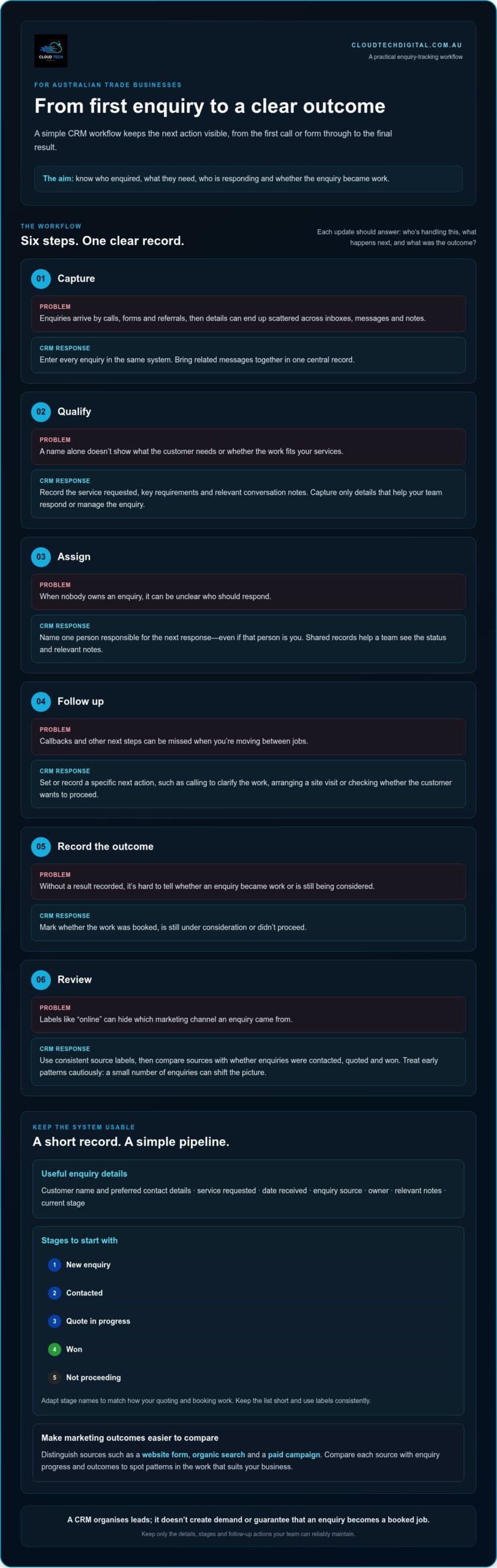
A CRM works best when it follows the real path from first contact to a clear outcome. Keep the workflow practical: capture the enquiry, qualify what the customer needs, assign responsibility, follow up, record the result and review what happened. Each update should answer a useful question: who’s handling this, what’s the next action, and did the enquiry become work?
A simple record might include the customer’s name and preferred contact details, the service requested, the date received, the enquiry source, an owner, relevant conversation notes and the current stage. For example, write “website form, bathroom plumbing, call to clarify scope” rather than leaving the details in an inbox. Record only information that helps your team respond, provide the service or manage the enquiry.
- Capture: Enter enquiries from calls, forms, referrals and other channels in the same system.
- Qualify: Note the type of work, key requirements and whether it fits your services.
- Assign: Make one person responsible for the next response, even if that person is you.
- Follow up: Set or record the next action, such as arranging a site visit or checking whether the customer wants to proceed.
- Record the outcome: Mark whether the work was booked, is still under consideration or didn’t proceed.
- Review: Look for patterns in enquiry sources, responses and outcomes.
Which enquiry stages should a small trade business track?
Start with stages your team can apply consistently: new enquiry, contacted, quote in progress, won and not proceeding. Adapt the labels to match how your quoting and booking actually work. Keep the list short. A complicated pipeline is harder to update between jobs and less useful if everyone interprets the stages differently.
How can lead tracking inform marketing decisions?
Use consistent source labels to distinguish, for instance, a website form, organic search and a paid campaign. Lead-source tracking means recording where an enquiry came from so you can compare its progress and outcome with other enquiries. Avoid vague labels like “online” if they hide the difference between channels.
Over time, compare the source with whether the enquiry was contacted, quoted and won. This can help you spot patterns, such as a channel generating enquiries that rarely progress, or one producing work that suits your business. Treat early results cautiously: a small number of enquiries can shift the picture, and a recorded source doesn’t explain every reason a customer chose or declined to proceed.
A clear record also makes your lead generation strategy for tradies more measurable by connecting marketing activity with enquiry outcomes, while keeping the CRM focused on follow-up. Website conversion, SEO and paid advertising play a separate role in attracting and converting potential customers. Digital marketing and lead tracking can work alongside your CRM process.
CRM Options Compared: Spreadsheet, Lightweight System or Trade Platform?
The right setup is the one your team can keep current. A spreadsheet may be enough for a solo operator with a manageable flow of enquiries. A lightweight CRM focuses on customer records and follow-up, while a trade-oriented platform may combine those features with day-to-day job tools. These options overlap, but they don’t all solve the same problem.
Use this comparison to shortlist an approach that fits your actual work, rather than choosing from a long list of features.
Spreadsheet
- Setup effort: Low if you create a simple template.
- Shared visibility: Works best when everyone uses the same accessible file; separate copies can create confusion.
- Follow-up prompts: Usually depend on someone checking the sheet or setting reminders elsewhere.
- Reporting: Basic sorting and summaries can show enquiry patterns, but require consistent data entry.
- Best fit: A solo operator or small business testing a straightforward process.
Lightweight CRM
- Setup effort: Some initial configuration to set up customer fields and enquiry stages.
- Shared visibility: Designed to keep customer records and updates in one place for the team.
- Follow-up prompts: May include tasks or reminders, depending on the system.
- Reporting: Can make it easier to review sources, enquiry stages and outcomes.
- Best fit: A business that needs more structure around enquiries without replacing its job tools.
Trade-oriented platform
- Setup effort: Depends on how much of the platform’s broader functionality you plan to use.
- Shared visibility: May connect customer and enquiry details with job information.
- Follow-up prompts: Varies by platform and configuration.
- Reporting: May cover enquiry activity alongside operational information.
- Best fit: A business looking to manage customer enquiries as part of a broader trade workflow.
When can a spreadsheet be enough?
A spreadsheet is a reasonable starting point if one person handles most enquiries and can reliably update a shared record. Keep the columns focused on useful details, such as contact, work type, source, status and next action. It becomes harder to manage if people edit separate files or rely on memory for callbacks, but spreadsheets can still suit some businesses.
What should a small-business CRM comparison include?
Test how easily the team can update a record on the go, assign responsibility and see the next action. Check whether reporting answers practical questions, such as which enquiries progressed to quotes. A workflow or pipeline is the set of stages an enquiry moves through. Also consider whether the tool complements existing quoting and job processes; don’t assume it connects to other systems.
Quick pros and cons
- Spreadsheet: Simple to start and adapt; less support for prompts and shared ownership.
- Lightweight CRM: Focused on customer follow-up and visibility; needs setup and regular updates.
- Trade platform: Can bring enquiry handling closer to job operations; broader functions may be unnecessary if you only need lead tracking.
Choose the least complicated option that makes enquiry ownership, follow-up and outcomes visible. That gives your lead generation strategy for tradies a clearer way to assess which enquiries progress, without confusing CRM record-keeping with scheduling, quoting or accounting.
How to Choose and Set Up a CRM Without Adding Admin
A CRM should make the work easier to manage, not create another chore. Start with the enquiry process you already use, then set up only the stages, fields and follow-up habits your team can maintain while jobs are underway.
- Map current enquiries. Note where enquiries come from, who handles them and where details or callbacks tend to get lost. Include website forms and phone enquiries, as well as referrals and advertising.
- Choose essential stages. Use a short sequence that reflects your real process, such as new, contacted, quote in progress, won and not proceeding. Keep labels clear and avoid stages that don’t lead to a different action.
- Compare systems. Prioritise quick record updates, mobile access, shared visibility and practical task handling. Consider your team size, enquiry volume and current quoting process before weighing up extra features.
- Trial the workflow. Enter a few realistic enquiries and follow them through the stages. Check whether the team can record the next action without duplicating details or interrupting the quoting process.
- Review and refine. Set a regular time to check incomplete records and overdue actions. Remove fields or steps that add effort without helping the team manage an enquiry.
Which CRM requirements matter most for a small trade team?
Keep the essentials visible: who owns each enquiry, what needs to happen next and where the record stands. A solo operator may value fast updates above team permissions, while a growing crew may need a shared view of enquiries and follow-up responsibility. Automation, which means software performing routine actions, can wait until the stages and information are being recorded consistently.
Website forms are one part of this process. Make sure the enquiry path on your site asks for useful details and makes it straightforward for a potential customer to get in touch. Thoughtful web design for tradies can support a clearer route from a visitor’s first click to an enquiry your team can manage.
How should you introduce a CRM to the team?
Agree on a minimum record standard, such as contact details, work requested, source, owner and next action. Then demonstrate the workflow with familiar examples, including a call that needs a callback and a website enquiry that needs a quote. A short, regular check-in can catch missing details and stalled actions before they become harder to resolve.
Connect your record-keeping process to the wider lead generation plan for Australian tradies: marketing brings potential customers to your business, and a consistent CRM routine helps the team manage what happens next. Cloud Tech Digital’s lead generation support connects marketing activity with enquiry tracking.
Connect CRM Follow-Up with a More Measurable Tradie Lead Strategy
A CRM can show what happens after an enquiry reaches your business. If records consistently capture the source, follow-up status, whether a quote was prepared and the final outcome, you can review how enquiries progress over time. That gives you a more useful view than simply counting calls or form submissions, while keeping expectations grounded: tracking helps inform decisions, but it can’t guarantee a particular number of leads, jobs or revenue.
What should tradies review in a lead-generation report?
Keep the report focused on practical questions. Which sources brought enquiries? Were they contacted? Did they lead to a quote, booked work or no further action? Reviewing these details together can help show where follow-up is stalling and which channels appear to attract enquiries that fit your services.
Use the same source labels and outcome definitions each time. If one team member records “Google” and another records “website”, comparisons may be misleading. If only a few enquiries have come through a channel, treat the pattern as a prompt to investigate, not a firm conclusion. Record outcomes consistently before making major marketing changes.
When can marketing support complement a CRM?
A CRM manages the enquiries your business receives; it isn’t a substitute for marketing that attracts potential customers. SEO can help people find your business through search, while Google Ads and social advertising can promote your services. Your team can then use its CRM process to manage responses, quotes and outcomes.
Your website is part of that path too. Clear service information and a straightforward enquiry form can help visitors understand what to do next. A well-planned landing page can focus attention on a particular service or campaign. Cloud Tech Digital provides SEO, Google Ads, social advertising, website and landing-page services that can complement your internal enquiry follow-up. These channels can work together as part of a broader marketing approach for tradies.
For a useful review, compare like with like: look at the same period, use consistent source labels, and distinguish enquiries from quotes and booked work. Then consider what the records suggest about both marketing and follow-up. A lead generation strategy for tradies becomes easier to refine when it connects the activity that attracts enquiries with the process that manages them, without treating correlation as proof that one channel caused a result.
To connect your marketing activity with clearer lead tracking, explore lead generation support for your trade business.
Make Your Next Enquiry Easier to Measure
Your next step doesn’t need to be a major software overhaul. Start by tightening one part of the process: make sure every new enquiry has a source, an owner and a clear next action. Once that habit is established, you’ll have a more dependable picture of how your marketing and follow-up are working together.
A thoughtful lead generation strategy for tradies connects the way customers find your business with what happens after they get in touch. Cloud Tech Digital supports trade businesses with digital marketing, including SEO, Google Ads, social advertising, websites and landing pages. Client testimonials highlight sales increases and rapid lead turnover. These marketing services complement your CRM, helping attract enquiries while your team manages the follow-up.
Ready to connect your marketing activity with clearer lead tracking? Build a more measurable lead-generation strategy for your trade business. A practical process, consistently followed, can give you a stronger foundation for making informed decisions and growing with confidence.
Frequently Asked Questions
What is the best CRM for a small trade business in Australia?
The best CRM is the one that suits your enquiry process and team, not necessarily the one with the longest feature list. Before choosing, run a realistic example through it: record a new request, assign a follow-up and find the customer record again on a mobile device. Consider how easy it is to correct mistakes and retrieve your data if you change systems. These practical checks reveal fit better than a feature list alone.
Does a small trade business need a CRM?
No, not every small trade business needs dedicated CRM software. It becomes more useful if customer details are hard to retrieve, several people share enquiries, or repeat customers need a clear service history. If you’re working solo and have a manageable enquiry flow, a simpler record-keeping method may do the job. The key test is whether your current approach reliably helps you act on enquiries and recognise returning customers.
Can a spreadsheet work instead of a CRM for tradies?
Yes, a spreadsheet can work if it’s kept in one agreed location and someone is responsible for updating it. Add a unique reference for each enquiry so similar customer names don’t get mixed up, and use consistent date and status formats. A quick weekly check for blank owners or next actions can help keep the list usable. If maintaining the sheet becomes a burden, reassess the setup.
How should tradies track leads from different marketing channels?
Use a short, agreed source list, such as referral, organic search, paid search, social media or website, and apply it consistently. If an enquiry comes through a campaign landing page, note that campaign separately where practical. You can also ask customers how they found you, while recognising that their answer may not capture every step. Review source records alongside enquiry outcomes rather than judging a channel by enquiry count alone.
What information should a tradie record in a CRM?
Record what helps the team respond and manage the work: customer name, preferred contact details, requested service, enquiry date, source, responsible person and next action. Add relevant job notes, such as access details or the customer’s preferred appointment window, when they affect planning. Keep notes factual and useful. Avoid collecting personal details that have no bearing on the enquiry or service, as extra information can clutter records and make them harder to use.
Can a CRM generate leads for a trade business?
A CRM mainly helps manage and track enquiries; it doesn’t, by itself, create demand. A lead generation strategy for tradies may use SEO, paid advertising, social advertising and a clear website to attract potential customers. The CRM then helps the business record what happens after someone enquires. Keeping these roles distinct makes it easier to see whether the challenge is attracting enquiries, responding to them or progressing quotes.
How can a small trade team get staff to use a CRM consistently?
Make updating the CRM part of an existing handover, such as after a call or before passing an enquiry to a colleague. Agree on the minimum information everyone must enter, then use the same example enquiries to practise the process. Keep the system straightforward and invite staff to flag fields they can’t maintain on the go. A short check-in to resolve stuck records helps reinforce the habit without turning updates into a separate admin project.
