


What if the calls showing up in your reports are actually just taps on a phone number, or conversions counted twice by different platforms? If you’re asking how to track phone call leads from my website, start by separating a click from a completed call, then connect that call to the marketing that brought the visitor in.
It’s frustrating when website calls disappear into a general enquiries total, especially when you’re investing in SEO or paid campaigns and can’t see what’s working. A click-to-call event can show that someone tapped your number, but it won’t confirm they called, became a genuine lead or turned into a customer. Useful tracking follows the journey further.
This guide explains practical ways to capture website calls, attribute them to campaigns and connect call records with lead quality and sales outcomes. You’ll also learn where Google Analytics 4 and Google Ads fit, how call tracking software can add detail, and how to choose a setup that matches your business and reporting needs. The aim is clear, reliable insight you can use to make better-informed marketing decisions, not another number that looks good in a dashboard but tells you little about real business.
Key Takeaways
- Learn how to track phone call leads from my website by choosing a method that distinguishes phone-number clicks from actual calls.
- Compare click events, advertising platform reports and dynamic number insertion to understand what each can reveal about call sources.
- Set up tracking around the information you need, from campaign and landing page to call outcome.
- Connect call records to consistent CRM stages so you can see which enquiries qualify, get booked or become sales.
- Use regular reviews of call sources and lead outcomes to guide SEO, landing page and paid campaign improvements.
Why website phone calls disappear from marketing reports
Website call tracking links incoming calls to the website visits or marketing sources that may have prompted them. Without that connection, a call can appear only in a phone log, while analytics reports show website traffic and advertising platforms show their own conversions. The pieces exist, but they don’t tell one joined-up story: which campaign brought the visitor in, whether they called, and whether the enquiry led to business.
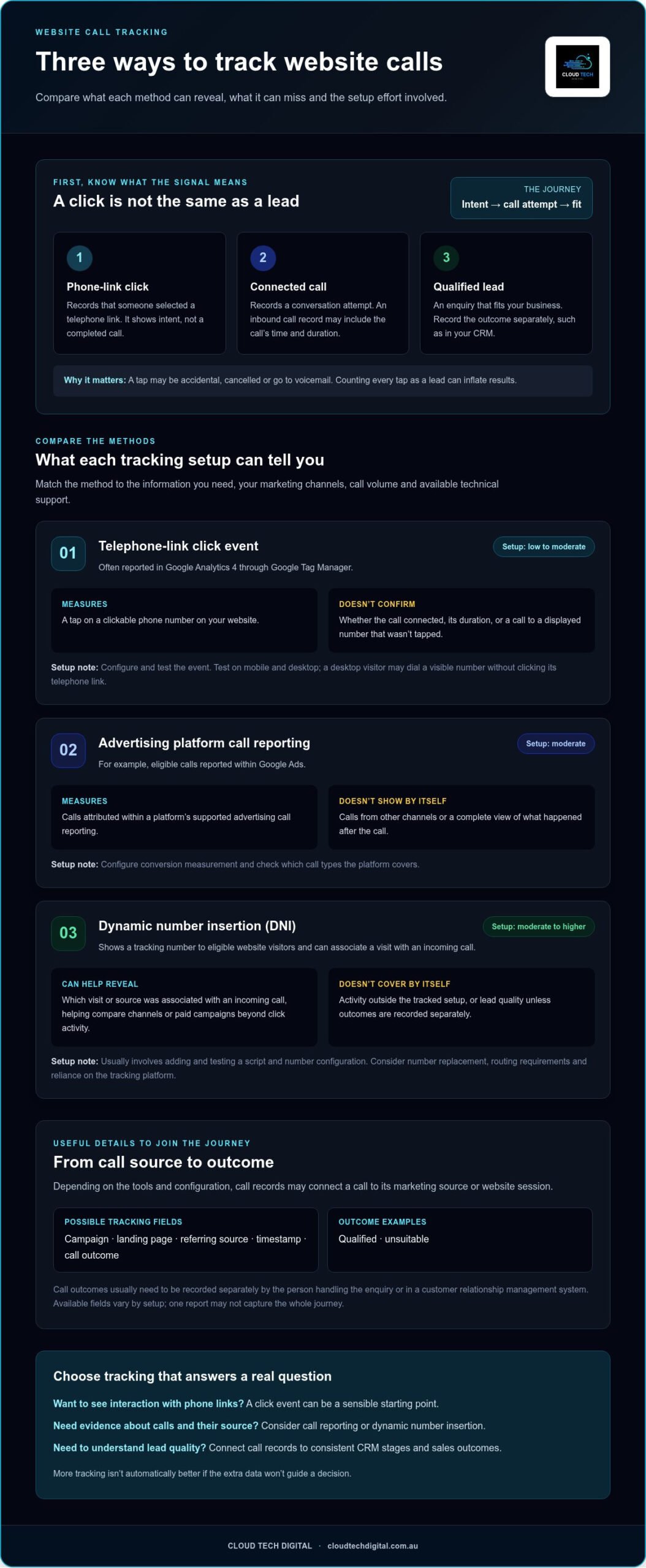
A phone number tap is easy to misread. A visitor might tap the link accidentally, cancel before the call connects or reach voicemail. Treating each tap as a lead can inflate results and steer campaign decisions in the wrong direction. The distinction is simple: A phone-link click records intent, a connected call records a conversation attempt, and a qualified lead records an enquiry that fits your business.
What does website phone call tracking actually measure?
A click-to-call event records that someone selected a telephone link on your website. It doesn’t confirm that the phone dialled, that the call connected or how long the conversation lasted. An inbound call record, by contrast, can capture details such as the call’s time and duration. More advanced setups may connect that record to a visitor’s marketing source or website session.
Depending on the tools and configuration, useful fields may include the campaign, landing page, referring source, timestamp and call outcome. For example, a record might connect a call to a paid search campaign and the page the visitor viewed before calling. The call outcome, such as qualified or unsuitable, usually needs to be recorded separately by the person handling the enquiry or in a customer relationship management system. Available fields vary by setup, so don’t assume one report captures the whole journey.
Why website calls are easy to miss
Phone enquiries often bypass website forms altogether. A prospective customer on a mobile device may see a service page, tap the number and call straight away. If your reporting counts only form submissions, that enquiry won’t appear as a website lead, even though the site helped generate it.
Analytics tools can track a tap on a telephone link, but that event doesn’t confirm a connected call. The visitor may cancel, have a call fail or choose not to proceed. If your report labels every tap as a completed call, it blurs the difference between interest and an actual conversation. That makes call volume look more certain than it is.
Attribution can also break between systems. Advertising reports may count an ad interaction, website analytics may record a session or click, and sales records may contain the enquiry without its original source. When those records aren’t connected, it’s difficult to see which marketing activity prompts calls or which calls produce business. Answering how to track phone call leads from my website starts with recognising these gaps, then choosing a setup that joins the useful evidence without treating every signal as a sale.
Compare website call tracking methods before choosing a setup
The right setup depends on what you need to know. A simple click event can show that a visitor tried to call, while call reporting or dynamic number insertion can provide evidence about calls themselves and where they came from. Match the method to your call volume, mix of marketing channels, reporting needs and available technical support. More tracking isn’t automatically better if the extra data won’t guide a decision.
| Method | What it measures | What it misses | Setup effort |
|---|---|---|---|
| Telephone-link click event | A tap on a clickable phone number, often reported in GA4 through Google Tag Manager. | Whether the call connected, its duration, or calls to a displayed number that wasn’t tapped. | Low to moderate. Requires an event configuration and testing. |
| Advertising platform call reporting | Calls attributed within a platform’s supported ad reporting, such as eligible calls from Google Ads. | Calls from other channels and a complete view of what happened after the call. | Moderate. Configure conversion measurement and check which call types it covers. |
| Dynamic number insertion (DNI) | A tracking number shown to eligible website visitors, which can associate a visit with an incoming call. | Activity outside the tracked setup, and lead quality unless outcomes are recorded separately. | Moderate to higher. Usually involves adding and testing a script and number configuration. |
When are click-to-call events enough?
Click events can be a sensible starting point if you need to understand whether visitors interact with phone links, rather than prove calls took place. Google Tag Manager can send a telephone-link click event to Google Analytics 4 for reporting. Test it on mobile and desktop. A desktop visitor may dial a number they can see without clicking a telephone link, so that call won’t create the event.
When do call tracking numbers add useful attribution?
DNI can display different tracking numbers to eligible visitors based on their source, then connect an incoming call to the visit. That can help compare channels or paid campaigns beyond click activity. Twilio’s guide to How Call Tracking Works explains the role of unique numbers and call routing. Weigh the added attribution against number replacement, routing requirements and reliance on the tracking platform.
For example, if you run paid search and SEO but only need a basic indication of phone-link interest, click events may be proportionate. If calls are a key enquiry path and you need to compare sources, DNI can provide a closer link between visit and call. Platform reporting may suit a business focused on a particular advertising channel, but it won’t automatically unify every source or show which enquiries become sales.
Start with the question your reports need to answer, then choose the lightest setup that can answer it reliably. If you’re reviewing how call attribution fits into wider lead generation campaigns, Cloud Tech Digital can help connect tracking insights with ongoing marketing decisions.
How to set up website phone call lead tracking step by step
A useful setup starts with the business question, not the software. Decide whether you need to measure phone-link interest, connected calls, qualified enquiries or sales, then build tracking around those outcomes. This makes reports easier to interpret and helps avoid treating every recorded interaction as a lead.
- Define the outcomes. Agree what counts as a call, a qualified enquiry and a sale. Keep these as distinct stages so reports show progress rather than combining clicks and business outcomes.
- Choose a tracking method. Use a telephone-link click event for call intent, advertising platform reporting for calls attributed within that platform, or dynamic number insertion when you need to associate website visits with calls. Select based on your channel mix, reporting needs and technical support.
- Map each report field to its source. For example, website analytics may provide the landing page and campaign details; a call tracking setup may record call time and duration; your customer relationship management system or sales process can supply outcomes such as qualified, booked or won. Don’t assume every system captures every field.
- Implement the measurement. Configure a consistent telephone-link event using Google Tag Manager and Google Analytics 4, or set up the chosen call reporting method. Make sure event names and outcome labels are clear enough for the team to use consistently.
- Connect sources and test. Confirm how website, advertising and sales records will be compared, then run test visits and calls before relying on the numbers. Record any gaps, such as calls made from a displayed desktop number that aren’t tied to a click event.
Configure website and campaign tracking
Standardise campaign names and UTM parameters before comparing traffic. If the same paid campaign is labelled differently across links, reports can split its results into separate rows. In Google Tag Manager, configure the telephone-link event to fire only when a visitor selects a relevant phone link, then check the event is received in GA4. Where dynamic number insertion is used, test that the displayed number updates as intended and remains usable on the page. Keep a simple record of event names and campaign conventions for anyone maintaining the setup.
Test calls and check reporting before relying on results
Test the full journey, not just the tag. Visit from the relevant campaign paths on mobile and desktop, select the phone link where applicable, and place a test call through the tracking setup. Check whether reporting separates a click from a connected call and any later outcome recorded by your team.
A tracking test is only complete when it confirms both that the event is captured and that the call is attributed to the intended source. Document the reporting time zone, attribution window and known limitations, such as untracked calls or missing campaign details. That context helps prevent mismatched dates or incomplete records from being mistaken for a campaign change.
This practical process answers how to track phone call leads from my website by turning separate signals into a sequence you can check. Once the setup is working, keep the definitions consistent as campaigns and pages change, so your reports remain useful for marketing decisions.
Connect call attribution to qualified leads and sales
A high call count can look promising, but it doesn’t show whether callers need the work you do, book a job or become customers. Some calls may be wrong numbers, existing customers or enquiries that don’t fit your services. To judge marketing performance, connect the call source with what happened after the conversation.
Record each enquiry in your CRM or another consistent sales record, using a small set of clear statuses, such as qualified, booked, won and unsuitable. Add the call’s source or campaign where known, then update the status as the enquiry progresses. If a sale is won, include its value when your reporting process supports it. That gives you a path from marketing activity to outcomes, rather than a call total on its own.
Build a reporting view around call outcomes
Keep distinct stages visible in your report: total calls, connected calls, qualified enquiries and sales. Compare those stages by source or campaign to see where suitable enquiries and wins come from, not just where the most calls originate. A qualified phone lead is a caller who meets the business’s stated criteria for a suitable enquiry and a potential next step. Define those criteria with your team and apply them consistently, so the same type of caller isn’t labelled differently from one week to the next.
For example, a campaign could generate fewer calls than another but more qualified enquiries or booked work. That’s a useful signal to investigate, not an automatic verdict: consider the time taken for leads to progress, the service being promoted and whether the records are complete. Source, lead status and sale value together can help you decide where to review landing page messaging, SEO priorities or paid campaign settings.
Troubleshoot gaps, duplicates and misleading attribution
Before acting on a report, check the tracking itself. Confirm that relevant telephone-link events are firing, campaign tags use consistent names and any dynamic number replacement works across the pages and devices you expect to measure. A missing event or number that doesn’t update can leave calls without useful source details.
Next, review how each platform defines and attributes a conversion. Google Ads, website analytics and call tracking platforms may use different attribution rules, reporting windows and conversion actions. The same call or customer journey might therefore be credited differently, or appear more than once if overlapping actions are counted together. Settle on a primary reporting view and document which conversions it includes; use platform reports to understand channel performance within their own rules, not as interchangeable totals.
Call duration can help identify conversations worth reviewing, but it isn’t proof of lead quality. A long call might not be suitable, while a brief call could lead to a booking. Check the recorded outcome before drawing conclusions. This is the practical answer to how to track phone call leads from my website: follow attribution through to a consistent business result, then use that evidence to guide campaign decisions.
To connect call tracking with lead generation and campaign performance, explore Cloud Tech Digital’s marketing support.
Make phone call tracking part of a practical lead generation system
Tracking earns its place when it changes a decision. Set a regular review time to compare call sources with qualified enquiries, bookings and sales, then look for patterns rather than reacting to a single busy or quiet period. A weekly check can catch broken tracking or sudden changes; a broader monthly review can help assess campaign quality and decide where to focus next.
Cloud Tech Digital’s ongoing campaign monitoring and lead tracking can help connect website performance with marketing outcomes, giving SEO and paid campaign adjustments a stronger evidence base. Keep call data in context: a source may generate fewer calls but more suitable enquiries, while another may attract activity that rarely progresses. Neither call volume nor one strong result should be treated as a verdict on its own.
Turn tracking insights into specific marketing actions
Start each review with a practical question: which campaigns produce qualified calls, and which bring activity without suitable enquiries? Check whether the pattern points to an audience, search term, advert or page that needs attention. If callers repeatedly ask about a service that’s unclear on a landing page, improve the relevant content. If a campaign generates unsuitable enquiries, review its targeting and message before changing the whole strategy.
Look for recurring evidence across call outcomes, website behaviour and campaign performance. Use it to prioritise one or two focused improvements, then monitor what changes. After a significant website update, tag change or advertising adjustment, recheck the tracking as well as the results. Otherwise, a broken event or altered number display can look like a sudden shift in lead performance.
Bring website, advertising and lead data together
Connected reporting makes it easier to see how SEO, Google Ads and website pages contribute to enquiries, while sales outcomes show which activity is delivering suitable opportunities. A clear Australian lead generation agency approach treats those channels as parts of one system, not isolated dashboards. When the evidence points to a page issue, considered web design for tradies can help turn more relevant visits into useful enquiries.
Keep the review process manageable. Use the same outcome labels, compare the same reporting periods and note any changes that affect attribution. That consistency helps distinguish a genuine shift in lead quality from a measurement change. It also gives your marketing team a clearer basis for adjusting campaigns over time.
If you want to connect call tracking with practical marketing decisions, talk with Cloud Tech Digital about tracking your website leads.
Make your next marketing decision with confidence
Choose one practical question for your next review: which website or campaign activity is leading to enquiries that become worthwhile work? Use it to guide the next improvement, then keep checking whether the change brings better outcomes. That steady approach turns how to track phone call leads from my website into more than a reporting exercise. It helps you make marketing decisions based on what happens after a visitor calls.
Cloud Tech Digital has delivered SEO, advertising and website services since 2020. Ongoing campaign management includes performance monitoring, lead tracking and strategy adjustments, helping connect marketing activity with real business outcomes.
If you’re ready to make your website call data more useful, talk with Cloud Tech Digital about tracking your website leads. A clearer view of your enquiries can help you take the next step with confidence.
Frequently Asked Questions
Can Google Analytics 4 track phone calls from my website?
Google Analytics 4 can record telephone-link clicks, but it doesn’t detect a completed phone call by itself. You can configure Google Tag Manager to send an event when a visitor selects a clickable phone link, then check the event in GA4 reports. For example, you could compare phone-link activity across service pages. To measure connected calls or call duration, you’ll need a call tracking setup that captures those details.
Can I track calls without changing my business phone number?
Yes, you can keep your existing business number. One option is to track phone-link clicks without changing the number shown on your website, though this won’t confirm calls connected. Some call tracking setups use a temporary tracking number displayed to visitors and route calls to your usual number. Before using number replacement, check how it affects printed materials, saved contacts and visitors who return to the site.
Does clicking a phone number count as a phone call lead?
No. A click shows that a visitor selected a phone link, not that a call connected or resulted in a suitable enquiry. Someone might cancel the dialler, call later using another device or tap by mistake. Treat click data as an engagement signal, and keep it separate from completed calls and qualified leads. This distinction helps prevent website interactions being reported as confirmed business enquiries.
Can website call tracking show which Google Ads campaign generated a call?
Yes, if the tracking setup captures the relevant campaign information and connects it with the call record. Depending on the configuration, this may involve Google Ads call reporting or a call tracking tool that associates website visits with calls. Check that campaign tagging is consistent and that the conversion action measures the call type you care about. A campaign click alone doesn’t prove that a call took place.
Do I need to record phone calls to track website leads?
No. Call recording isn’t required to measure call events or connect calls with marketing sources. You can track details such as source, time and duration where your setup supports them, then have your team record the enquiry outcome in a CRM. Recording conversations is a separate choice that may involve privacy obligations. If you’re considering it, check current Australian requirements and get appropriate advice before implementation.
How can I tell whether tracked phone calls are qualified leads?
Define what makes an enquiry suitable for your business, then apply the same criteria after each call. For instance, a trade business might assess whether the caller needs a service it provides and whether there’s a clear next step. Record outcomes such as qualified, booked or unsuitable in your CRM. Reviewing those statuses alongside call source helps distinguish useful enquiries from calls that don’t fit your target work.
Why do my website call tracking numbers show different results from Google Ads?
Different totals don’t necessarily mean either system is broken. Google Ads and call tracking platforms may count different call types, use different attribution windows or assign credit to different interactions. A customer might click an ad, return later through organic search and then call, with each system reporting that journey differently. Compare conversion definitions, date ranges, time zones and duplicate actions before drawing conclusions from the figures.
