


What should a tradie website button say to turn a visit into a call or quote enquiry? The best call to action examples for tradie websites don’t rely on clever wording. They give each customer a clear next step that suits how urgent their job is and how ready they are to get in touch.
If your website gets visits but few enquiries, a generic “Submit” button may leave people unsure what happens next. Sending every visitor to the same form can also add friction for someone who simply wants to call, request a quote or ask a question. A clear, relevant CTA helps customers understand their options and take the next step.
In this guide, you’ll find 20 practical CTA examples for different trade jobs and customer situations, plus advice on where to use them. You’ll also learn how to make buttons easy to find and use on mobile, choose an enquiry path that fits the job and assess performance with lead tracking rather than guesswork. The aim is simple: make the next step obvious so more of the right visitors can act.
Key Takeaways
- Explore call to action examples for tradie websites, grouped by customer need and readiness to enquire.
- Choose between a phone call, quote form, booking request or service-page link based on what the visitor needs to do next.
- Match each CTA to the service page so customers can move forward without guessing what happens after they click.
- Use a practical process to write, position and test CTAs, then review which options lead to relevant enquiries.
- See how clear website design and enquiry tracking can help you make informed improvements over time.
What makes a call to action work on a tradie website?
A call to action (CTA) is a prompt that guides a visitor towards one specific next step. It might be a button, a link or a short line of text. On a trade website, that step should relate directly to the service the visitor is considering, rather than leave them guessing. Call to action (CTA) describes the broader marketing concept. For a tradie, the practical test is whether the prompt makes it clear how to enquire about a job.
A tradie website CTA tells a potential customer exactly how to take the next step towards discussing a job. That could mean calling, requesting a quote, booking an inspection or sending an enquiry. These actions give the business a way to follow up about potential work. By contrast, clicking through to another page or reading a post may show interest, but it doesn’t necessarily start an enquiry.
What should a tradie website CTA help a visitor do?
Give the visitor one clear primary action that fits the page. A plumbing emergency page might make calling prominent, while a renovation page could invite the visitor to request a quote. For planned maintenance, an enquiry or booking request may be more appropriate. The best option depends on the service, the customer’s urgency and the information needed to respond usefully.
Clarity matters at the point of decision. “Request a roofing quote” sets a clearer expectation than “Get started”. Supporting text can explain what details to provide or what happens next, so the visitor knows what they’re agreeing to before sharing contact details.
Why generic calls to action can miss the mark
“Submit” describes what a button does, not what the customer gets by using it. A service-related prompt, such as “Enquire about a bathroom renovation”, connects the action to the visitor’s need and makes the form’s purpose easier to understand. The wording should match the form too. Don’t invite someone to book an inspection if the form only sends a general message.
A clearer CTA can reduce uncertainty, but wording alone can’t guarantee more calls or sales. Service information, the form experience, placement and follow-up all influence whether a visitor proceeds. The best call to action examples for tradie websites are specific, relevant to the page and honest about what happens after the click.
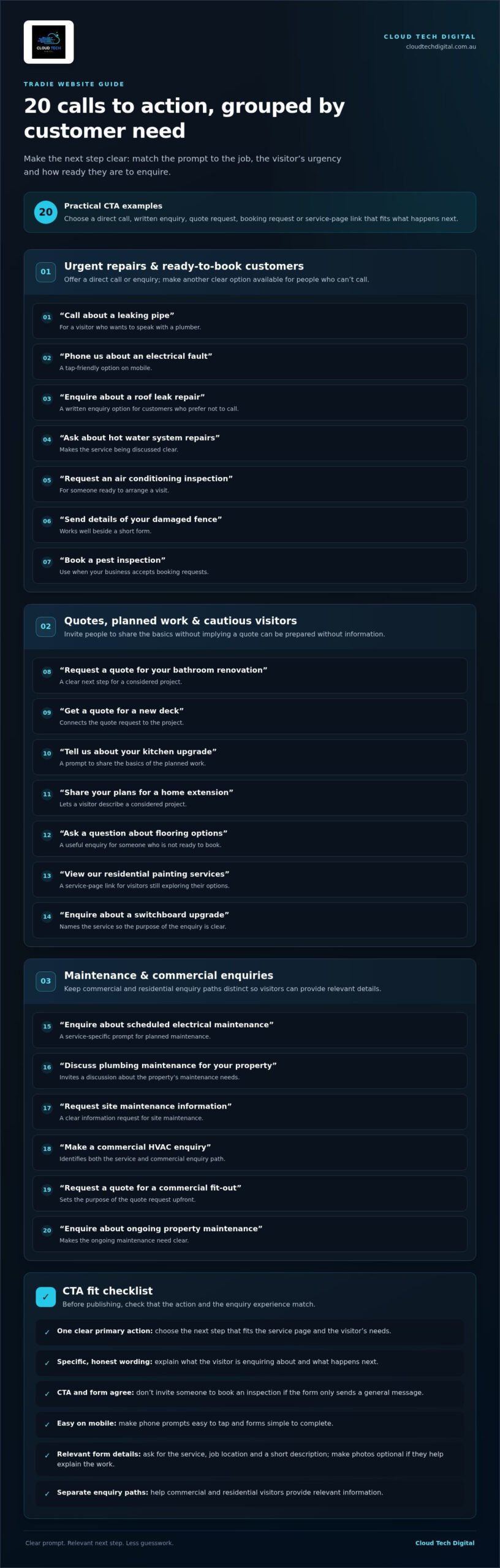
20 Call to action examples for tradie websites, by customer need
The right prompt depends on the job and how ready the visitor is to speak with you. Use these examples as starting points, then adapt the wording to match the services you provide and what happens after someone clicks. On mobile, make phone prompts easy to tap and keep forms simple to complete.
CTAs for urgent repairs and ready-to-book customers
When someone needs help with a specific fault, a direct call or enquiry can be the clearest next step. Make sure your website explains when customers can reach you and gives them another clear enquiry option if they can’t call.
- Call about a leaking pipe: for a visitor who wants to speak with a plumber.
- Phone us about an electrical fault: a tap-friendly option on mobile.
- Enquire about a roof leak repair: for customers who prefer a written enquiry.
- Ask about hot water system repairs: makes the service being discussed clear.
- Request an air conditioning inspection: for someone ready to arrange a visit.
- Send details of your damaged fence: works well beside a short form.
- Book a pest inspection: use when your business accepts booking requests.
CTAs for quotes, planned work and cautious visitors
For considered projects, invite the customer to share the basics rather than imply a quote can be prepared without information. A form can ask for the service, job location and a short description. Make photos optional if they help explain the work.
- Request a quote for your bathroom renovation
- Get a quote for a new deck
- Tell us about your kitchen upgrade
- Share your plans for a home extension
- Ask a question about flooring options
- View our residential painting services
- Enquire about a switchboard upgrade
These prompts give cautious visitors a useful next step without pushing them to book before they’re ready.
CTAs for maintenance and commercial enquiries
If your business serves both commercial and residential customers, separate those enquiry paths. Visitors can then provide relevant information, such as property type or maintenance needs, without having to navigate a one-size-fits-all form.
- Enquire about scheduled electrical maintenance
- Discuss plumbing maintenance for your property
- Request site maintenance information
- Make a commercial HVAC enquiry
- Request a quote for a commercial fit-out
- Enquire about ongoing property maintenance
For ideas on attracting and converting trade enquiries, read this lead generation guide for tradies. If your website needs clearer enquiry paths, explore conversion-focused website design for tradies.
Call, quote form or booking button: which tradie CTA fits?
The right CTA is the easiest honest next step for that visitor. Choose a format that suits the job, the customer’s readiness and the way your business handles enquiries. A phone button can help someone explain a problem, while a customer planning a renovation may prefer to share project details in a form.
| CTA format | Best fit for visitor | Information needed | Follow-up expectation |
|---|---|---|---|
| Phone call | Ready to talk, or has an urgent or complex job to explain | Enough detail to start a conversation | The business needs to be able to respond through the number shown |
| Quote form | Considering planned work and ready to describe the project | Service type, job description and useful contact details | The business reviews the enquiry and follows up through the contact details supplied |
| Booking request | Ready to request a visit or appointment | Details needed to assess and arrange the request | Make clear that this is a request, unless the booking is confirmed immediately |
| Service-page link | Still comparing options or learning about a service | None to view the page | The visitor can read more before choosing how to enquire |
When should a tradie website use a call button?
Use a call CTA when speaking with someone is the most useful way to clarify the work, such as discussing a fault or a job with several unknowns. On mobile, make the phone number a tap-to-call link and give it clear wording, such as “Call to discuss your repair”. If calls aren’t answered at certain times, explain the alternative enquiry option clearly so visitors know how else to get in touch.
When is a quote form or booking prompt a better fit?
A quote form suits work that needs a description before you can assess the enquiry. Ask only for details that support a useful follow-up, and tell visitors what information to include. A booking prompt is appropriate when there’s a clear process for receiving and handling booking requests. If a visitor is still weighing up options, link to relevant service information instead of pushing them straight to a form.
These practical call to action examples for tradie websites work best when the button, form and follow-up process all match. Set expectations accurately, then make the chosen action easy to find and use.
How to write, place and test CTAs on a tradie website
A clear CTA is useful only if it appears where customers need it, leads to a working next step and attracts enquiries your business can handle. Use this four-step process to make decisions based on the customer journey, then review what happens after visitors act.
- 1. Choose the action. Decide what a visitor should do on that page: call, request a quote, ask a question or view service details. Match the action to the job and the way your business handles enquiries.
- 2. Write the prompt. Start with an active verb and name the action. Add the service where it helps, such as “Request a quote for roof repairs”. Keep the button concise and put extra details beside it.
- 3. Place it in context. Put the primary CTA near relevant service information, then repeat it after supporting proof, such as project examples or customer testimonials. Make the action easy to spot without forcing visitors to hunt for it.
- 4. Review the results. Track completed forms and calls where measurement is available. Check whether enquiries are relevant to the services offered, not just how many people clicked.
Write button copy that sets a clear expectation
Good button copy tells visitors what they can do and where the action leads. “Enquire about electrical repairs” is more informative than “Continue”. If a form asks for job details, explain briefly what information helps you understand the request. Avoid implying a guaranteed quote, appointment or response time unless that is part of your process.
Test placement and performance without guessing
Change one meaningful element at a time, such as button wording or position, so you can make a fair comparison. Review results over a period that makes sense for your website’s enquiry volume, and compare completed actions and enquiry quality. A click is a useful signal, but it doesn’t confirm that a potential customer completed the form or called.
Judge CTA performance by useful enquiries, not button clicks alone. If clicks rise but relevant enquiries don’t, check the form, page content and follow-up path before deciding the CTA is working.
Connect the CTA to the rest of the website
Keep the ad or search result, landing page, service description and CTA focused on the same customer need. Test every form on a mobile device, make fields easy to complete and show a clear confirmation after submission so visitors know their enquiry went through. For broader site structure, see this guide to web design for tradies.
These call to action examples for tradie websites are a starting point, not a substitute for checking what works on your own site. If you’re ready to improve how your website presents and tracks enquiries, explore website design for tradies.
Turn the right tradie website CTA into a measurable growth step
A CTA works as part of a wider path: the right visitor finds a relevant page, understands the service and can take a clear next step. Website design helps make that step easy to find and use. Relevant traffic brings people with an interest in the work, while enquiry tracking helps you see which actions lead to suitable conversations. These elements work together, but no CTA or marketing approach can guarantee a particular result.
Use a simple framework to choose the next CTA to improve
Start with evidence from your own website rather than changing several buttons at once. Choose a service page that attracts visits but isn’t generating enough relevant enquiries, then check whether its main prompt fits what visitors are likely looking for.
- Find the page: Review website and enquiry data to identify a service page that needs attention.
- Check the fit: Ask whether the CTA matches the customer’s likely urgency, desired action and the follow-up your business can provide.
- Make one change: Improve one practical element, such as the button wording, visibility or path to the form.
- Track actions: Review completed forms and calls where tracking is available, and note whether enquiries suit the service.
This keeps the process manageable and gives you a clearer basis for deciding whether to keep the change or try a different improvement.
When expert support can help improve website enquiries
If visitors struggle to find the right information or complete an enquiry on mobile, website design support can help address page structure and usability. If the issue may involve attracting the right visitors or understanding which marketing activity leads to enquiries, SEO, Google Ads, social media advertising and lead tracking are areas to review. The right support depends on what your website data and business goals show.
Cloud Tech Digital is an Australian-owned agency specialising in lead generation for tradies. Its services include website design, landing pages, SEO and paid advertising, with lead tracking to assess activity. The aim is to connect the website experience and marketing activity with measurable enquiry actions, without assuming that one change will suit every trade business.
Give visitors a clear next step, and make yours clear too
Use the call to action examples for tradie websites in this guide as a starting point. Choose a prompt that reflects the customer’s needs, explains the next action honestly and fits the way your business handles enquiries. Then review the results and make considered improvements.
Talk with Cloud Tech Digital about a conversion-focused website or lead-generation approach.
Make your next website enquiry easier to win
The strongest call to action examples for tradie websites match the visitor’s needs with one clear, honest next step. Choose a call, quote form, booking request or service link based on the job and your business’s follow-up process. Place the prompt where it makes sense on the page, then assess completed enquiries rather than button clicks alone.
Small, deliberate improvements can help you understand where visitors get stuck and what deserves attention next. Clear website design, relevant traffic and enquiry tracking each play a role, but results depend on how they work together and aren’t guaranteed by changing a button alone.
Cloud Tech Digital has provided SEO, advertising and bespoke website design services since 2020, with a focus on lead generation for tradies. If you’re ready to review your website’s enquiry path, talk with Cloud Tech Digital about a website built to generate tradie enquiries.
Start with one page and one practical improvement. A clearer next step can make it easier for the right customers to get in touch.
Frequently Asked Questions
What is a good call to action for a tradie website?
A good CTA tells a potential customer exactly what to do next and relates to the service they’re viewing. For example, a visitor on a roofing page could see “Request a roof repair quote”, while someone with a job to discuss might prefer a call option. The best call to action examples for tradie websites also set honest expectations about what happens after someone clicks or gets in touch.
What should a tradie website button say?
Use an active verb and name the action, adding the service if it makes the choice clearer. “Enquire about a switchboard upgrade” gives more context than “Submit” or “Click here”. Keep the button text short enough to scan, particularly on mobile, and explain important details beside it. Make sure the wording matches the destination: a quote button should lead to a form that lets the visitor describe the work.
Should tradies use a call button or a quote form?
Choose a call button when talking is the most useful way to understand the job and your business can respond through that channel. Use a quote form when customers need to share project details before you can assess their enquiry. Some service pages can offer both, with one clearly presented as the primary option. Keep forms focused on the information needed for a useful follow-up, rather than asking for unnecessary details.
Where should a call to action appear on a tradie website?
Place the main CTA near the relevant service information, where visitors can act once they understand what you do. You can repeat it further down the page after useful supporting details, such as project examples or customer reviews. On mobile, check that the prompt is easy to find and tap without obscuring important content. Every CTA should lead to a working phone link, form or relevant page.
How many calls to action should a tradie website have?
Give each page one primary action, then repeat it where it helps visitors take that same next step. A service page could feature a quote prompt near the introduction and again after project information. Too many competing buttons can make the choice unclear, especially if they lead to different forms or actions. Secondary options, such as viewing another service, can still be available without competing with the page’s main purpose.
How can I tell if my website CTA is working?
Track completed forms and calls where measurement is available, then assess whether those enquiries relate to the services you provide. Button clicks alone don’t show whether a visitor completed the next step or made a relevant enquiry. Check that forms work, confirmation messages appear and phone links function on mobile. Compare results after changing one element, such as the wording or position, so you can see what may have influenced the outcome.
Should every tradie service page use the same CTA?
No, tailor the primary CTA to the service, visitor intent and follow-up process. A customer considering a renovation may need to describe a project, while someone comparing services might first want more information. The action should also be one your business can genuinely support. Keep the overall approach consistent across the website, but adjust the service wording and enquiry path where customer needs differ.
