


Better Google Ads leads start with better feedback. Improving lead quality from Google Ads means sending qualified leads and sales outcomes from your CRM back to Google Ads as offline conversions, then using those results to guide Smart Bidding. Upload outcomes regularly, ideally daily, so bidding can respond to the quality of leads your business values.
It’s frustrating when a campaign generates enquiries but few become worthwhile customers. More form submissions won’t solve the problem if Google Ads can’t distinguish a promising prospect from a poor-fit enquiry. The key is to connect advertising activity with what happens after someone gets in touch.
This guide explains how to connect CRM outcomes with conversion tracking, choose useful lead stages and values, and refine targeting and bidding using quality feedback. You’ll also learn to assess performance by qualified leads and sales, rather than enquiry volume alone.
Key Takeaways
- Feed qualified leads and sales outcomes from your CRM back into Google Ads so bidding can learn from lead quality, not just form submissions.
- Refine audiences and exclusions around the customers you want to reach, and use weak enquiries to identify targeting that needs attention.
- Test broad match alongside Smart Bidding, with bid targets grounded in your actual business goals and past performance.
- Judge campaign results by qualified leads, sales and revenue, then use those outcomes to guide your next optimisation.
Offline conversion imports and CRM connections
Connect enquiry records to campaign outcomes so Google Ads can learn which conversions become quality leads. Start by mapping each CRM stage to a conversion action.
When collecting Australian lead data, explain how details will be used and shared, and obtain appropriate consent. Limit access and use to those stated purposes, and respect people’s choices about marketing communications.
-
Connect CRM data and import offline conversions
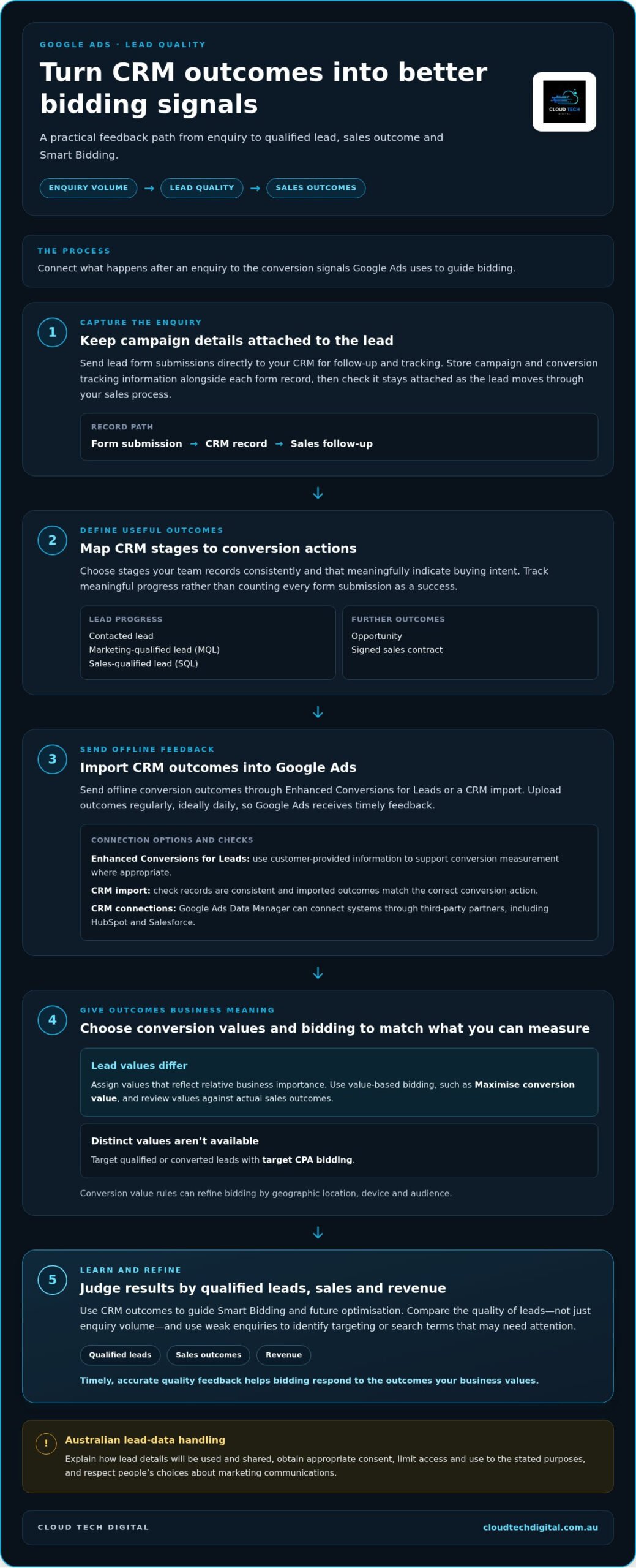
Send offline conversion outcomes from your CRM to Google Ads through Enhanced Conversions for Leads or a CRM import. Track meaningful stages, such as a contacted lead, qualified lead or signed sales contract, rather than counting every form submission as a success.
Store campaign and conversion tracking information alongside each form record, then check that it stays attached as the lead moves through your sales process. Upload outcomes regularly, ideally daily, so Google Ads receives timely feedback. Send lead form submissions directly to your CRM for follow-up and tracking.
-
Use first-party data and enhanced conversions
Use information customers provide to support conversion measurement, and configure Enhanced Conversions for Leads where appropriate. Google Ads recommends enhanced conversions to improve the accuracy of online and offline measurement.
-
Optimise for lead stages and conversion value
Set distinct conversion actions for marketing-qualified leads (MQLs), sales-qualified leads (SQLs) and opportunities. This gives Google Ads a clearer signal than a single generic lead conversion. Choose stages your team records consistently and that meaningfully indicate buying intent.
If lead values differ, assign values that reflect their relative business importance and use value-based bidding, such as Maximise conversion value. If you can’t assign distinct values, target qualified or converted leads with target CPA bidding. Conversion value rules can refine bidding by geographic location, device and audience. Review values against actual sales outcomes.
Audience targeting and exclusions
Build campaign groups around Australian service areas, devices, audiences and services. Then use lead tracking to compare which segments produce qualified enquiries, not just clicks.
-
Segment campaigns by location, device, audience and service
Separate campaigns or ad groups by the locations you serve, the services you sell and the audiences you want to reach. If your business serves several regions in Australia, compare location performance without blending results across your service area.
Review mobile and desktop outcomes separately, then check whether each service attracts the right enquiries. Keep ad assets and landing page content relevant to the service and location. Avoid grouping unrelated services together, as this can obscure which message is attracting quality leads.
-
Target high-intent audiences and apply exclusions
Prioritise audiences showing clear interest, such as people searching for a specific service or returning after visiting your site. Spending more than 30 seconds on a website can be one retargeting signal, but assess it alongside enquiry and sales stages.
- Set budget and bid targets from business outcomes. Compare the cost of qualified enquiries across locations, devices and services before shifting spend. Align CPA or ROAS targets with your actual goals and past performance, including seasonal patterns and promotions. Don’t set targets so tightly that campaigns can’t respond to changing demand.
Review search terms and audience performance regularly, then move budget toward segments producing stronger opportunities. If your campaign structure needs work, Google Ads campaign support can help connect targeting decisions with measurable lead outcomes.
Broad match with Smart Bidding
Google Ads recommends broad match with Smart Bidding in Search campaigns to find relevant queries. For qualified leads, use value-based bidding when lead values differ, or target CPA when they don’t.
-
Refine keywords, match types and negative keywords
Review Google Ads search terms weekly, then add negative keywords for queries that bring poor-fit enquiries. For example, a trade business seeking commercial projects could exclude searches clearly focused on household DIY. Keep useful variations eligible instead of blocking a broad term that also attracts qualified prospects.
Use broad match with Smart Bidding to capture relevant searches beyond the exact wording of your keywords. Review search terms alongside CRM outcomes: a click is an opportunity to assess, not proof of lead quality. Remove irrelevant queries, retain terms associated with quality leads, and measure how each change affects qualified conversions.
Keep conversion signals accurate. If a campaign counts every form submission equally, bidding may optimise for volume rather than sales potential. Enhanced conversions can support measurement, but they don’t replace reviewing search terms and lead outcomes.
-
Choose a bidding strategy for qualified leads
Choose bidding based on what your business can measure reliably. When qualified leads have different business values, use Maximise conversion value or Maximise conversion value with Target ROAS. When you can’t assign distinct values, use target CPA for qualified or converted leads instead of optimising for unqualified form submissions.
Set targets using past performance, actual CPA or ROAS goals, and patterns such as seasonality or previous promotions. A target that ignores these patterns can restrict bidding or pull it away from commercial priorities. Review qualified lead outcomes alongside campaign activity, then adjust targets when the evidence shows a change is needed.
Test broad match in a Search campaign with Smart Bidding and meaningful conversion actions. Monitor search terms weekly, and make one clear change at a time, such as adding a negative keyword or refining a target. This helps you assess whether the change improves qualified opportunities, rather than judging bidding by clicks alone.
Using lead quality feedback to improve advertising
Turn sales outcomes into advertising signals. Google Ads can optimise for qualified leads, booked appointments and quote requests, not simply more submissions. A consistent feedback loop is central to improving lead quality from Google Ads because it reveals which enquiries become meaningful business opportunities.
- Choose a lead outcome that reflects real buying intent, such as a qualified lead or signed contract. Record the outcome consistently in your CRM, then report it to Google Ads as an offline conversion. This gives campaigns a clearer signal about which enquiries progress beyond the initial form.
Keep the conversion action close enough to the ad interaction to support useful optimisation. Where possible, choose an outcome that occurs within seven days, so feedback can inform campaign decisions sooner.
- Improve the information your lead form collects. Ask one or two relevant qualifying questions about budget, timeline or intended use, and use Google Ads’ “More qualified” lead form setting to prioritise fewer, better submissions. For example, a service business could ask when the work is needed.
Use reCAPTCHA or phone verification as basic spam checks. Then compare submitted details with CRM outcomes. A completed form is a conversion, but it isn’t automatically a quality lead.
- Assess calls by their business outcome, not call volume alone. A five-second misdial tells you little about demand, while a 30-minute sales call may indicate a genuine opportunity. Track which calls become qualified leads or sales, then use those outcomes to inform campaign optimisation.
Google Ads conversion goals can include qualified leads, converted leads, appointment bookings and quote requests. Select goals your team records reliably, and don’t treat soft engagement as equivalent to a sales opportunity.
- Assess advertising by cost per qualified lead, customer acquisition cost, revenue, profit and lead quality. If submissions rise but qualified opportunities fall, investigate the campaign, search terms and form questions before increasing spend. If sales improve, identify which lead sources and messages contributed.
Make one clear adjustment at a time, then compare CRM results with Google Ads reporting. This makes improving lead quality from Google Ads an ongoing process grounded in business outcomes, rather than form volume alone.
Want to turn lead-quality insights into a stronger campaign? Explore lead generation support tailored to your advertising goals.
Cloud Tech Digital: Lead Generation Agency in Australia
Cloud Tech Digital helps Australian businesses build lead generation campaigns focused on stronger enquiries, not submission volume alone. If your Google Ads account attracts leads but has no clear link between campaign performance and sales outcomes, Cloud Tech Digital’s Pay Per Click Agency service can help align advertising with your business goals.
Campaign performance also depends on what happens after the click. Cloud Tech Digital’s landing pages and web design can make the offer, service area and next step clearer for prospective customers. This gives visitors a more relevant path to enquire and provides your advertising with a focused destination.
For support connecting campaign strategy, lead quality and website experience, contact Cloud Tech Digital to discuss your advertising needs.
Turn lead feedback into your next growth step
Make lead quality part of your campaign planning. Agree on what a valuable enquiry looks like, then use that shared definition to guide decisions across marketing and sales. Consistent feedback gives your business a clearer basis for improving lead quality from Google Ads over time and keeps campaign choices tied to commercial priorities.
If you want a partner to put this approach into practice, Cloud Tech Digital offers lead generation and pay-per-click services, alongside Facebook Ad Management. The right support can connect campaign strategy with how your business attracts and evaluates enquiries.
Start a conversation about what your campaigns need next. Contact Cloud Tech Digital for support, and take the next step towards more relevant leads.
Frequently Asked Questions
Need Help Improving Lead Quality?
Yes, especially if sales and marketing disagree about what makes an enquiry worthwhile. Start by documenting your team’s lead criteria, then compare them with the conversions your campaigns currently record. If the definitions don’t line up, Cloud Tech Digital can connect lead generation activity with more relevant business outcomes through its digital marketing services for Australian trade businesses.
How do you define and measure lead quality in Google Ads?
Define a quality lead by the fit and actions that matter to your business, not by form completion alone. For example, a plumbing business might assess whether an enquiry requests a service it provides, includes usable contact details and progresses to a booked job. Compare campaign sources against qualified enquiries and completed sales, then identify which signals reliably distinguish prospects from poor-fit contacts.
How can Google Ads conversion tracking be set up to track qualified leads and sales?
Set up distinct conversion actions for meaningful milestones, then test each one before using it to guide campaign decisions. For example, track an enquiry separately from a confirmed booking so reports show where prospects progress or drop out. Check that each action fires once for its intended event and that test submissions appear under the correct action in Google Ads.
How do you import offline conversions and CRM lead outcomes into Google Ads?
Keep the Google Ads click identifier with the lead record from the moment someone submits an enquiry. In your CRM, record the outcome and its date, then map that status to the matching conversion action before importing it. For example, a quote request that becomes a sale should retain its original campaign attribution rather than count as a new online form conversion.
How can landing pages and lead forms be improved to screen for higher-intent prospects?
Match the landing page headline to the service and promise in the ad, then make the next step clear. Use form fields that help your team assess fit, such as the service required or project timeframe. A dedicated page for a specific service can also reduce confusion, while clear descriptions help visitors decide whether the offer suits their needs.
How can spam, bots, duplicate enquiries, and low-intent leads be identified and prevented?
Look for repeated contact details, incomplete or nonsensical submissions, and enquiry patterns that don’t match genuine customer behaviour. Use CRM rules to flag matching email addresses or phone numbers so repeated submissions don’t inflate lead totals. Review flagged records before excluding them, as genuine customers may enquire more than once. Keep suspicious records separate from qualified conversions in campaign reporting.
